our clock
Same hour, across worlds.
Share your routine with the people closest to you, and see when you’re both likely to be free, in your time and theirs.
Free, no account, under a minute.
Already use our clock? Open your week
Your time · their time · our time
Why our clock
Some of the people closest to you live on the other side of the world. In Second Life, that’s normal. Your partner wakes up as you’re winding down. Your best friend logs on while you’re at work.
So you ask “what time is it for you?” again and again, do sums in your head, and miss evenings you could have had.
Calendars are too much. Nobody wants to book their partner. Trackers are worse: they watch people who never agreed to it.
That’s where our clock sits: in the gentle middle.
You share your routine, not your whereabouts.
They share theirs. And you both see the hours you have in common, each in your own time.
When your day changes, change it. They’ll see it next time they look.
How it works
-
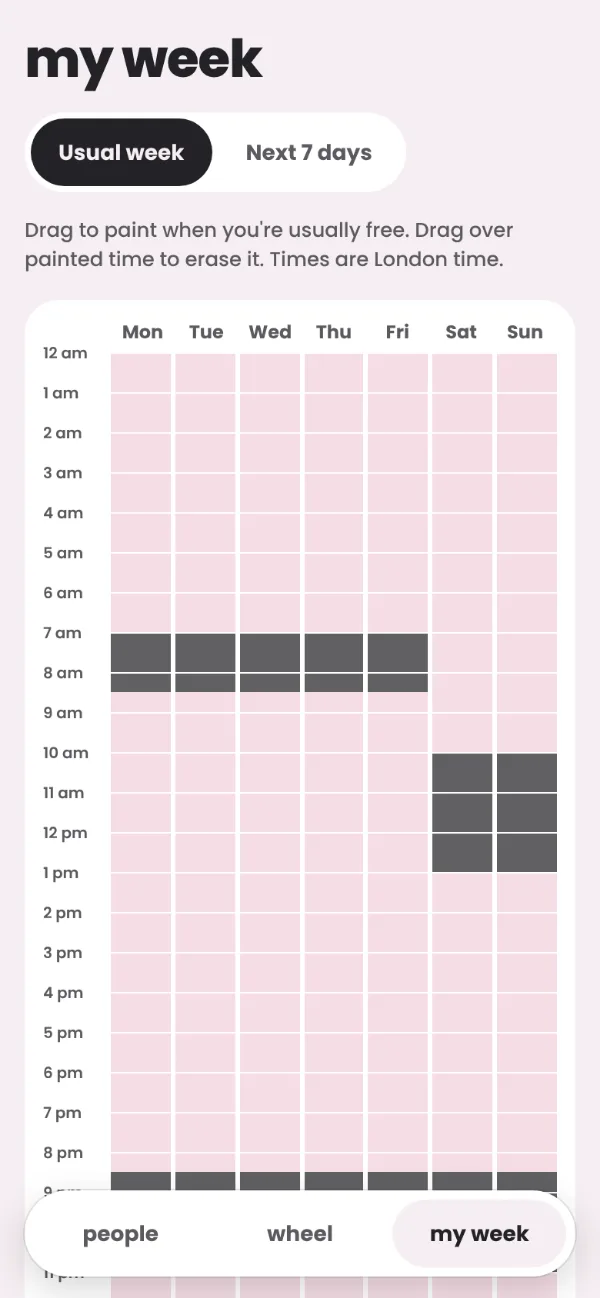
Paint your routine.
Tap or drag across the hours you’re usually free. It takes under a minute, and our clock handles your timezone and daylight saving.
-
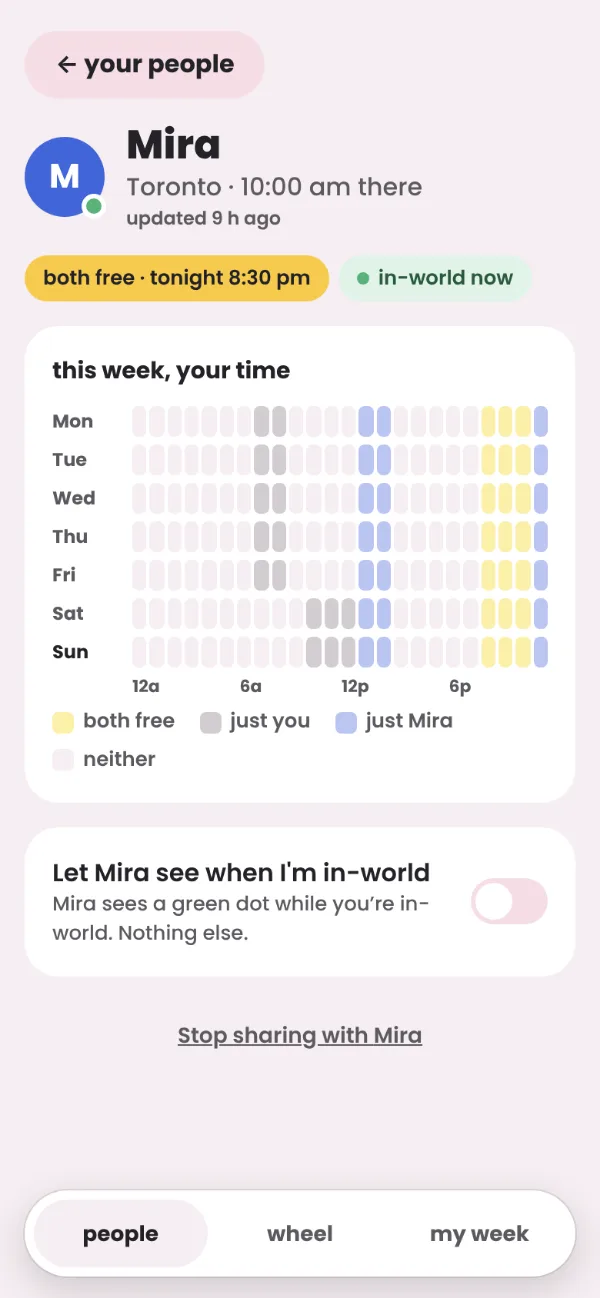
Invite your person.
Send them one private link. They paint their routine, and you can each see the other’s. Up to three people, and each one is just the two of you.
-
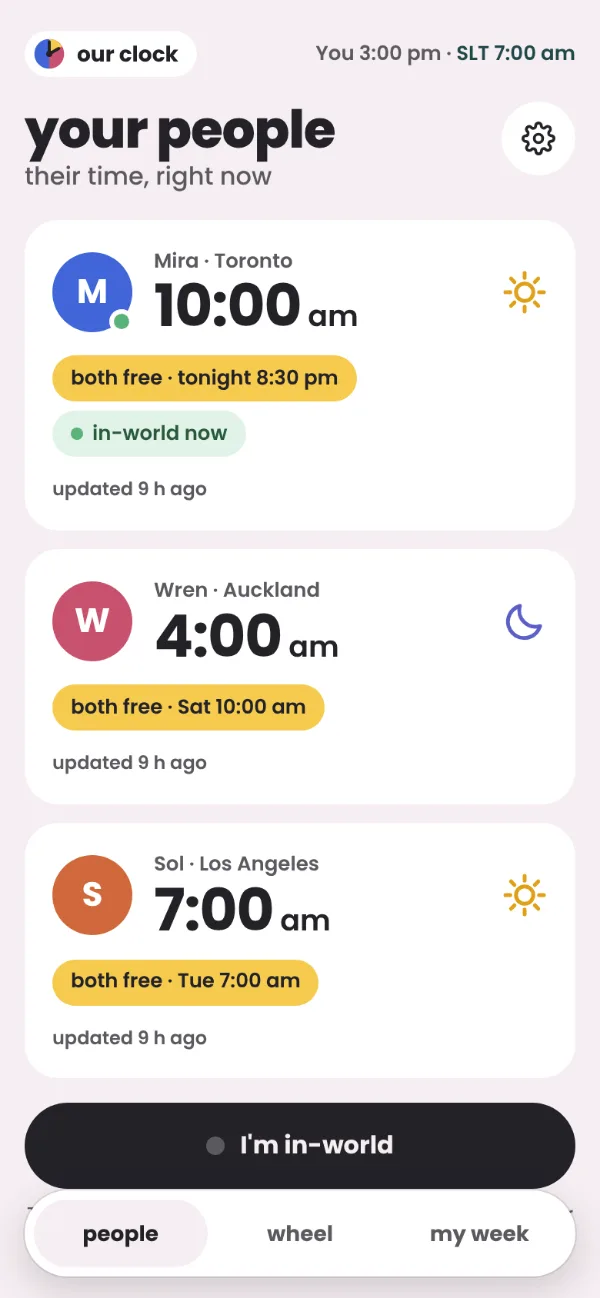
See your same hour.
“both free · tonight 8:30 pm”, in your time, SLT and theirs. Those are your golden hours, and they’re always yellow.
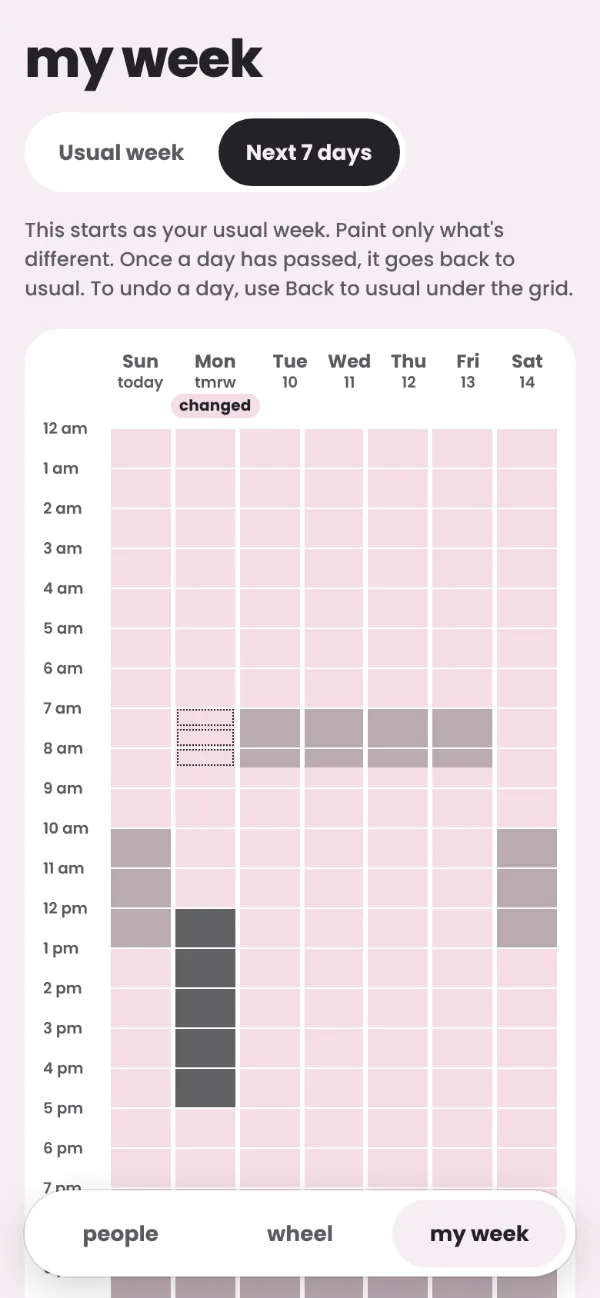
Life doesn’t keep to a routine.
Work runs late. Real-life plans shift. Open Next 7 days and paint over any day that’s different. Your usual week stays as it is, and once the day has passed, it goes back to usual on its own.
Your person sees “updated 2 h ago” and which day changed. No pings, no messages, nothing to reply to.
Private by design.
- No accounts. No email, no password, no real name.
- No tracking. It never checks whether anyone is online. It only knows what you tell it about yourself.
- No history. Changed days disappear once they’ve passed. In-world is only ever on or off, right now.
- No ads, and nothing sold or shared.
- Your choice, always. Your people see only what you share. Stop sharing, or delete everything, at any time.
Your week opens with your own link, so save it somewhere only you can see.
Wear it, and they’ll know you’re here.
 in-world
 can’t reach
 not paired
The our clock HUD sits quietly in the corner of your screen. While you wear it, your people see that you’re in-world (only the ones you’ve chosen). Touch it to see everyone’s local time.
A pair for L$99, one for you and one to give your person.
The app is free and works fine without it: just tap I’m in-world when you log in.
Questions
The basics
What is our clock?
A little clock for you and your person. You set your usual routine, change any day that’s different, and see when you’re both likely to be free, in your time, SLT and theirs.
Is it free?
Yes. The app is free, with no ads and no subscriptions, and everything in it works without paying. The only thing for sale is the optional Second Life HUD: a pair for L$99, one for you and one to give your person.
Do I need Second Life?
No. It’s made with Second Life in mind (SLT, avatar names, a HUD), but it works for anyone whose person is in another timezone.
Does it work on my phone?
Yes, in any browser. You can also add it to your home screen, where it opens full-screen like an app: Add to Home Screen in Safari, or Install app in Chrome.
Your week and your people
My days aren’t the same every week. Will this work for me?
Yes. That’s what changing a day is for. Open Next 7 days and paint over any day that’s different. Your usual week stays as it is, and once the day has passed, it goes back to usual on its own. If your weeks never look alike, you can leave your usual week empty and just paint the next 7 days.
How do I connect with someone?
Tap Invite someone and send them the link. When they open it and paint their week, you can each see the other’s. The link itself works once and expires after 7 days if nobody uses it. Once they’ve joined, you stay connected until one of you stops sharing.
Can my people see each other?
No. Each connection is private. Your partner can’t see your best friend, or even that they exist.
In-world
Does our clock check whether other people are online?
Never. It only knows what you tell it about yourself. It isn’t a tracker, and it never will be. You only ever see someone’s in-world status if they choose to share it with you.
I opened our clock inside Second Life and it doesn’t know me.
Second Life’s built-in browser keeps its own separate storage, so our clock shows you a screen saying so, with a Copy link button. Paste the link into Chrome, Safari or Edge. To stop it happening, set your viewer to open links in your normal browser (the screen tells you where).
Privacy and your own link
What does our clock know about me?
Only what you give it:
- the name you chose in our clock (not your official Second Life name, and not your real name);
- your timezone;
- your usual week and any changed days;
- your extra clocks, which only you see;
- whether you’re in-world right now, if you use that;
- and who you share with.
That’s it.
What’s “your own link”?
It’s your personal link to your week. With no account, it’s how our clock knows the week is yours. Save it somewhere only you can see, like your notes, an email to yourself, or your browser (our clock offers to save it for you when you set up). It’s not something to share: anyone who opens it can change your week. To share with your person, use Invite someone.
I cleared my browser (or got a new phone). Can I get my week back?
Yes, if you saved your own link. Open it, or on the first screen tap Already use our clock? Open your week and paste it in (your browser may fill it in for you). If you never saved it, there’s nothing to recover from, which is also why nobody else can get in, not even Envy. Paint a fresh week and invite your people again.
More questions? IM Envy Renard in Second Life, or use the feedback form.